
Subject
If your website brings in leads or sales, it needs regular care. WordPress powers over 40% of the web, which makes it powerful and popular, and also a favorite target for hackers. At Noventum™ Custom Software, we use it for most of our marketing and eCommerce projects. We also maintain it, because a site that’s launched and left alone eventually breaks.
Here’s why WordPress maintenance matters, and how to do it without losing sleep.
Why WordPress Websites Need Ongoing Maintenance
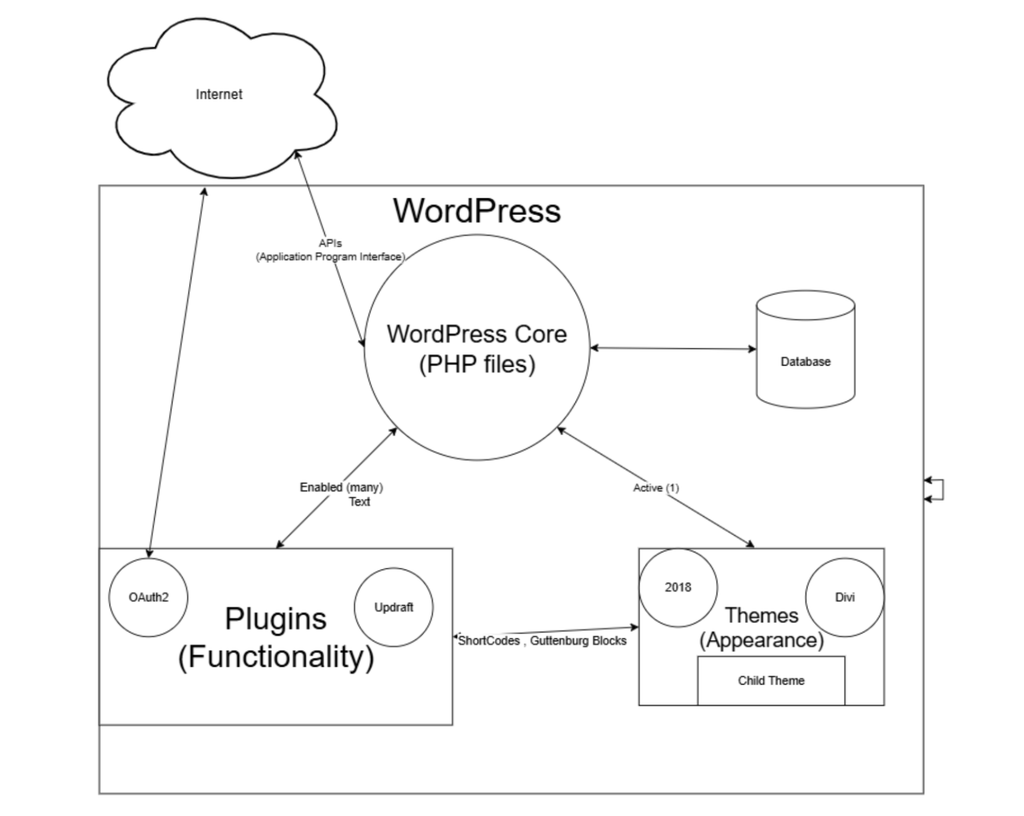
Software isn’t a fine wine that improves in the cellar. Everything your site depends on keeps changing:
- WordPress core gets frequent security and stability updates
- PHP, the language WordPress runs on, keeps evolving
- MySQL, the database that stores your content, keeps evolving
- Plugins and themes are updated by their developers all the time
As the old Greek saying goes, you can’t step into the same river twice. Your site has to keep up with the river.
What Happens When You Skip WordPress Maintenance
Skipping updates rarely causes an instant failure, which is why it’s so easy to put off. Over time, though, sites that go unmaintained tend to:
- Get hacked. Outdated core, plugins, and themes are a common way in. Attackers use compromised sites to send spam or sell counterfeit goods.
- Break. A plugin that’s out of sync with WordPress or PHP can take down a form, a checkout, or the whole site.
- Break and then get hacked. The worst of both.
- Slow down. Slow pages hurt both user experience and search rankings.
Why Plugin Updates Need Extra Care
Plugins give WordPress most of its functionality, from contact forms to online stores. They also have deep access to your site. A poorly maintained or buggy plugin can affect almost everything, including your database. That flexibility is part of why WordPress is so capable, and it’s why updates should never be a blind click.
How to Update WordPress Safely
- Back up first. Keep regular backups so you can roll back if something goes wrong.
- Update a copy of your site. Use a staging environment, not your live site.
- Test the important things. Check forms, checkout, login, and key pages.
- Go live once you’re confident. Repeat the same updates on production.
How Often Should You Do WordPress Maintenance?
Monthly is the minimum. If your site is how you generate revenue, such as an online store or a lead-gen site, check more often.
How Noventum Makes WordPress Maintenance Easy
You shouldn’t have to become a WordPress expert to keep your site healthy. We handle backups, safe updates, testing, and troubleshooting when someone else’s plugin code goes sideways. We lean on our hosting partner WP Engine and its Smart Plugin Manager, which automates most of the update work, so your team can stay focused on running the business.
WordPress Maintenance FAQ
Does WordPress really need maintenance?
Yes. WordPress core, plugins, themes, and PHP all change regularly, and your site has to stay compatible and secure as they do.
How often should I update WordPress plugins?
At least once a month, and more often for eCommerce or revenue-critical sites. Always back up and test first.
Is hosting the same as maintenance?
No. Hosting keeps your site online. Maintenance keeps what’s inside it updated, secure, and working.
Not sure when your site was last updated or backed up? Book a free 20-minute site health check and we’ll tell you where you stand. No pressure, just a friendly second opinion from a team that does this every day.
Tags
Gallery